How to Launch an NPS Program with Follow-up Branching
How to Launch an NPS Program with Follow-up Branching
Build an NPS workflow that goes beyond the score by branching detractors, passives, and promoters into the right follow-up and review process.
Quick takeaways
- The score matters, but the real operational value comes from the next question and the next team action.
- Branching lets different score groups see different follow-up prompts without making the core survey longer.
- A repeatable NPS program depends on stable structure, simple review, and fast export to the people who own the response.
An NPS program works best when it does more than collect a number. The score is useful, but the real value comes from what happens immediately after the score: who gets a follow-up prompt, how the results are reviewed, and how the team acts without waiting for a larger reporting cycle.
What a strong NPS workflow includes
- A simple score question that is easy to answer on any device.
- Follow-up branching so detractors, passives, and promoters do not all see the same next question.
- Operational review through a dashboard that shows both the score and the response pattern.
- Exportable feedback so the people who own recovery or retention can act quickly.
Step 1: Build the core score question
Start with a classic recommendation-style question if you want a traditional NPS motion, or use the same pattern for satisfaction, effort, onboarding, service, or internal team sentiment. What matters most is keeping the first answer fast and familiar.
If your team is already aligned around NPS, keep the first question conventional. That helps with adoption, reporting, and expectations across customer success, support, and leadership teams.
Step 2: Use branching instead of one generic follow-up
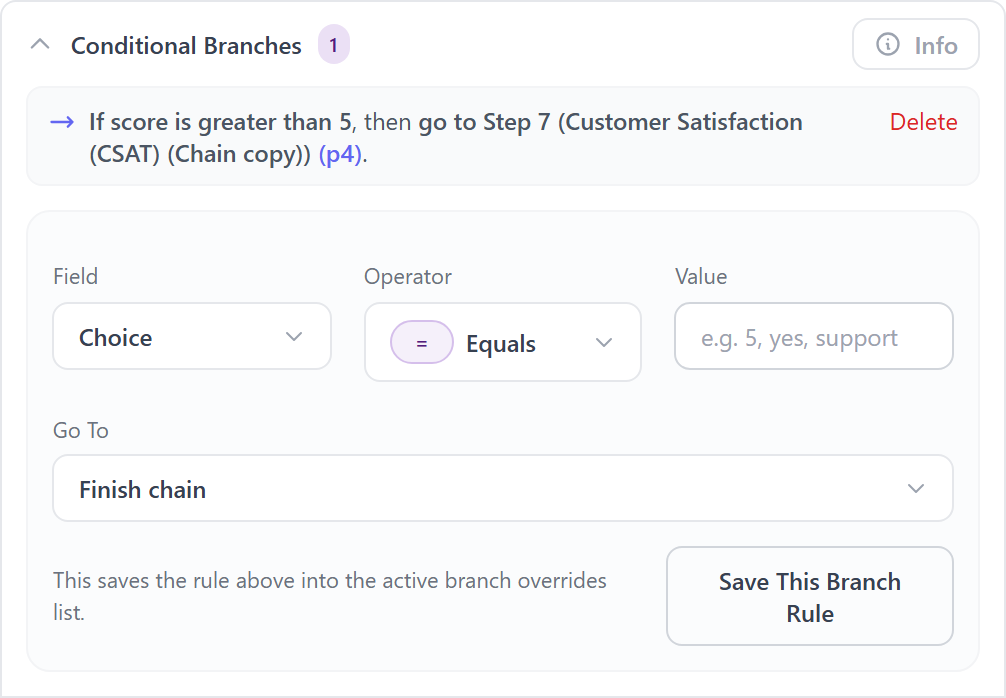
This is the part that changes the workflow from “survey collection” to “usable system.” Instead of asking every respondent the same text question, branch based on the score range.
A simple structure looks like this:
- Detractors get a short prompt asking what went wrong or what needs attention first.
- Passives get a question focused on what would improve the experience.
- Promoters get a question about what is working well, what should continue, or whether they would share a quote.
You do not need more questions. You need better next questions for the score someone actually gave.
Step 3: Choose the right operating model
For one-off launches, a standalone survey may be enough. For an ongoing program, a chain gives you more control over guided follow-up and reporting. The best choice depends on how operational you want the program to be.
Use a standalone survey when:
- you only need the score and one optional comment,
- you are validating the program before adding branching,
- or you need the fastest possible launch.
Use a chain when:
- different score groups should see different next prompts,
- you want to collect structured follow-up after the first answer,
- or the team needs a repeatable recovery workflow instead of a flat survey.
Step 4: Set response rules before launch
Before sharing the survey, decide how you want access and repeat responses to work. This matters more than most teams expect. If the program is public, think through response caps and whether multiple responses from one device or email are allowed. If the program is private or preview-only, confirm that before the first launch.
This is also the point where you should decide whether comments are required, whether email collection is necessary, and whether the workflow should be shareable by direct link, QR code, or embed.
Step 5: Review the dashboard like an operating screen
A good NPS workflow is not just a report card. Use the dashboard to spot patterns quickly:
- Which score bands are growing?
- Where are comments clustering?
- Are lower scores tied to one team, moment, or touchpoint?
- Are high scores concentrated in a segment you can learn from?
That is where Conejo becomes useful for service ops, CX teams, and internal stakeholders. The dashboard is not the endpoint — it is the handoff surface between collection and action.
Step 6: Keep follow-up lightweight and repeatable
The best programs are easy to repeat. Keep the score question stable, update the branching prompts only when the business question changes, and review responses on a predictable cadence. If you over-customize every send, the workflow becomes harder to trust and harder to compare over time.
Best practices for NPS and follow-up branching
- Keep the first score familiar. Use branching to add specificity, not complexity.
- Ask score-appropriate follow-up questions. Promoters and detractors should not see the same prompt.
- Review comments alongside the score mix. The numeric result alone rarely tells the full story.
- Use export when action belongs elsewhere. The right operational team should not have to hunt for the data.
- Prefer consistency over cleverness. Stable workflows are easier to benchmark and improve.
Where to go next
Once your core NPS motion is live, the next layer is usually a more targeted guide: routing detractor recovery, comparing repeated survey runs, or adapting the same structure for employee pulse or meeting feedback. The foundation stays the same: score first, follow up intelligently, then act quickly.
FAQ
Common questions
Do I need a chain for NPS, or can I use a single survey?
A single survey is enough if you only need the score and one optional comment. Use a chain when detractors, passives, and promoters should see different next questions.
What is the biggest mistake in an NPS workflow?
The biggest mistake is treating everyone the same after the score. A detractor, passive, and promoter usually need different follow-up prompts if the feedback is meant to drive action.
Can this same structure work for employee or internal feedback too?
Yes. The same score-plus-branching pattern works for employee pulse, meeting feedback, onboarding, service quality, and other recurring workflows where the next question should depend on the initial score.
Ready to launch your own feedback workflow?
Create a survey, share it anywhere, and start collecting live responses in minutes.